How to cancel your Eureka subscription
If you purchased your Eureka subscription online, you can access the cancellation option from Manage Subscription in your account menu.
1. Open Manage Subscription
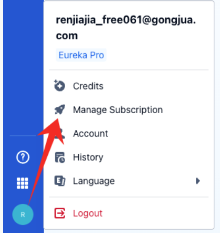
Sign in to the Eureka account associated with your subscription. Click your profile icon in the bottom-left corner, then select Manage Subscription.
2. Select Cancel Plan
Find the plan you want to cancel. Review the plan name, billing cycle and Current Period End date, then select Cancel Plan.
The screenshot shows an example subscription. Your plan name, price and billing dates may differ.
3. Complete the cancellation
Follow any on-screen instructions to complete the cancellation. If a confirmation prompt appears, review it before confirming. Check for a cancellation confirmation or an updated subscription status before leaving the page.
Related to
Was this article helpful?
Have more questions? Submit a request